I was annoyed with the manual switch in the kitchen to change the fanspeed of my WTW/HRV. So when my kitchen was remodelled I’ve removed the manual switch and moved it next to the WTW/HRV and added a zigbee relais controller for low power.
Hardware
The idea of the additional hardware was a zigbee enabled controller that could manipulate the wiring to change the setting of the WTW/HRV through homeassistant. As it’s only low current that is going through the wires I’ve decided to pick up the following device.
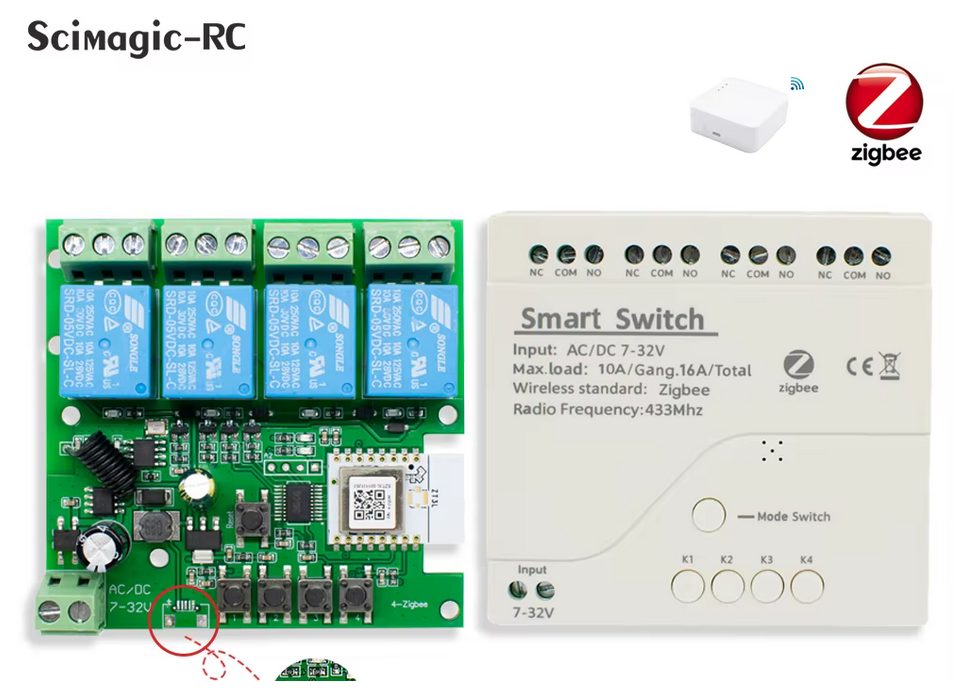
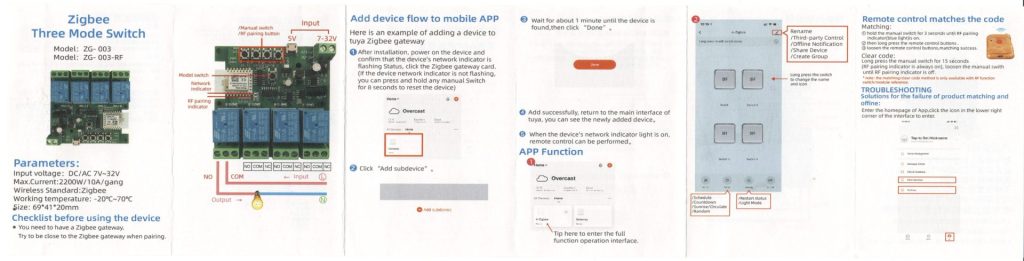
For a complete reference (and for myself to have all the information in one place), I’ve also added the manual that came with the device to this post.
Wiring
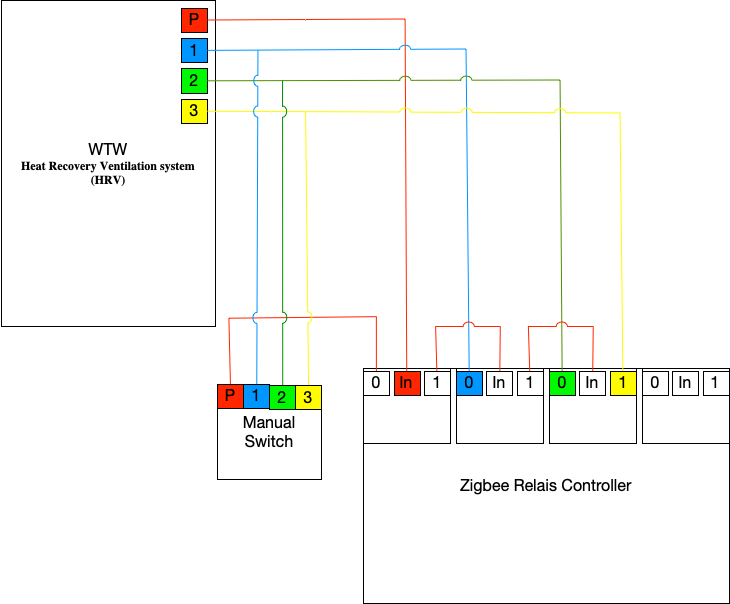
The wiring might look complex but is quite logical. Originally the manual switch was directly connected to the corresponding ports of the manual switch. I’ve bought a Zigbee Relais Controller that has 4 relais, but I will only use 3. You could also get by with a 2 relais controller, but I wanted a fallback to the original switch in case the Zigbee controller is unavailable. Because if the Relais Controller is powerless all the relais will switch to setting 0. So the first relais is a powercheck, if the Zigbee Relais Controller is operational this relais will always be on.
So if the first relais is on the incoming signal is wired to the second relais. If that relais is turned off “0” the current will go over the blue cable to the WTW/HRV speed 1. If that relais is turned on “1” though the signal is wired to the third relais. So this relais makes the choice either go for setting one or go for setting 2 or 3 (combined).
If that third relais is turned off the current will go over the green cable to the WTW/HRV speed 2. Finally if the third relais is turned on the current will go over the yellow cable to the WTW/HRV speed 3.
This way you get complete freedom with 3 relais and there is no risk of short circuiting.
Homeassistant Automation
Now we need to configure everything in homeassistant. My device presents 4 light switches. Since I named my device WTW the switches have the following ID’s
- light.wtw_light
- light.wtw_light_2
- light.wtw_light_3
- light.wtw_light_4
I created a counter helper entity and also called it wtw (counter.wtw), with a minimum value of 1 and a maximum value of 3 and the default value is 2. I use this as input for the automation so that it correspondents with the settings of the manual switch.
alias: Fan speed control via counter
description: Control fan relays based on counter.wtw_speed
triggers:
  - entity_id: counter.wtw
    trigger: state
actions:
  - choose:
      - conditions:
          - condition: state
            entity_id: counter.wtw
            state: "0"
        sequence:
          - target:
              entity_id: light.wtw_light
            action: light.turn_off
          - target:
              entity_id:
                - light.wtw_light_2
                - light.wtw_light_3
            action: light.turn_off
      - conditions:
          - condition: state
            entity_id: counter.wtw
            state: "1"
        sequence:
          - target:
              entity_id: light.wtw_light
            action: light.turn_on
          - target:
              entity_id: light.wtw_light_2
            action: light.turn_off
          - target:
              entity_id: light.wtw_light_3
            action: light.turn_off
      - conditions:
          - condition: state
            entity_id: counter.wtw
            state: "2"
        sequence:
          - target:
              entity_id: light.wtw_light
            action: light.turn_on
          - target:
              entity_id: light.wtw_light_2
            action: light.turn_on
          - target:
              entity_id: light.wtw_light_3
            action: light.turn_off
      - conditions:
          - condition: state
            entity_id: counter.wtw
            state: "3"
        sequence:
          - target:
              entity_id: light.wtw_light
            action: light.turn_on
          - target:
              entity_id: light.wtw_light_2
            action: light.turn_on
          - target:
              entity_id: light.wtw_light_3
            action: light.turn_on
            data:
              title: WTW High
              message: WTW set to high speed
mode: single
I want to have the speed influenced by the humidity in the bathroom and the state of the stove hood in the kitchen. Therefor I created some extra helpers counter.bathroom_fan_request and counter.kitchen_fan_request. Depending on the demand those settings will change and the following automation combines it into the setting for the WTW/HRV.
alias: Sync wtw_speed with bathroom/kitchen requests
description: Adjust counter.wtw based on bathroom and kitchen fan requests
triggers:
  - entity_id:
      - counter.bathroom_fan_request
      - counter.kitchen_fan_request
    trigger: state
actions:
  - variables:
      bath: "{{ states('counter.bathroom_fan_request') | int }}"
      kitchen: "{{ states('counter.kitchen_fan_request') | int }}"
      max_request: "{{ [bath, kitchen] | max }}"
  - choose:
      - conditions:
          - condition: template
            value_template: "{{ max_request == 3 }}"
        sequence:
          - target:
              entity_id: counter.wtw
            data:
              value: 3
            action: counter.set_value
      - conditions:
          - condition: template
            value_template: "{{ max_request == 2 }}"
        sequence:
          - target:
              entity_id: counter.wtw
            data:
              value: 2
            action: counter.set_value
      - conditions:
          - condition: template
            value_template: "{{ bath == 1 and kitchen == 1 }}"
        sequence:
          - target:
              entity_id: counter.wtw
            data:
              value: 1
            action: counter.set_value
      - conditions:
          - condition: template
            value_template: "{{ max_request == 0 }}"
        sequence:
          - target:
              entity_id: counter.wtw
            data:
              value: 0
            action: counter.set_value
mode: single
Automation for the bathroom
One of the main reasons for this was to be able to increase the fanspeed when the shower is being used. I’ve placed a zigbee humidity sensor in the bathroom (sensor.badkamer_humidity_humidity) which provides a percentage of humidity. In order to prevent any mold to grow the humidity should be between 40% and 60%. So I created the following automation to influence the counter.bathroom_fan_request helper entity that is used in the script above.
alias: Bathroom humidity → fan request
description: Adjust bathroom_fan_request based on humidity levels with hysteresis
triggers:
  - entity_id: sensor.badkamer_humidity_humidity
    trigger: state
actions:
  - variables:
      humidity: "{{ states('sensor.badkamer_humidity_humidity') | float(0) }}"
      current_fan: "{{ states('counter.bathroom_fan_request') | int(0) }}"
  - choose:
      - conditions:
          - condition: template
            value_template: |
              {{ humidity >= 60 or (humidity >= 55 and current_fan == 3) }}
        sequence:
          - target:
              entity_id: counter.bathroom_fan_request
            data:
              value: 3
            action: counter.set_value
      - conditions:
          - condition: template
            value_template: |
              {{ humidity <= 40 or (humidity <= 45 and current_fan == 1) }}
        sequence:
          - target:
              entity_id: counter.bathroom_fan_request
            data:
              value: 1
            action: counter.set_value
      - conditions:
          - condition: template
            value_template: |
              {{ 41 <= humidity <= 59 }}
        sequence:
          - target:
              entity_id: counter.bathroom_fan_request
            data:
              value: 2
            action: counter.set_value
mode: single
In case you wonder why the condition is so elaborate. It is done for a clear reason. If you use just 1 hard value, if the humidity sensor is balancing around that threshold value the setting will keep flapping. To prevent that I created a window of 5% that it will stay in the highest setting until it gets below the threshold – 5% and it will only speed up again if it reaches the threshold.
This is most of the setup I used. I didn’t include the kitchen automation as this is directly linked to my specific hardware I use in the kitchen and most likely isn’t usefull for anyone else.